Harness² video overview
A short animated tour of the two-level loop. Watch this first.
A Hanson Lab resource
Summary by Spencer. Based on the Harness² research from Google Cloud AI Research and Northwestern University; see the original sources.
This guide teaches the basics of graph engineering. Then it explains Harness², a Google Research framework. Harness² lets an agent improve its own setup on each task. The model weights do not change.
A language model alone only reads text and writes text. To do real work, it needs a system around it. This system gives it tools, memory and rules. People call this system the harness.
The Harness² website uses this same equation: "Agent = Model + Harness." Many posts about this topic show a ladder of four steps:
This guide covers two ideas:
Each word below has one meaning in this guide.
Google Cloud Tech explains graph engineering in the video Graph Engineering 101. In the video, a graph can look like an organization chart. Each node can be an agent node or a function node. A function node runs fixed logic.
Graph engineering is not about knowledge graphs. The video makes this point clearly. Here, "graph" means a workflow.
Start many tasks in parallel. This is faster than one task after another.
Wait for all tasks to finish. Then collect all outputs into one record.
Pick the next step from a condition. Use plain code when you can.
The video uses a pull request (PR) review as its example. Five fetch steps run in parallel. A join collects their results. A router then sends the work to a fixer agent or to a human.
Google's Agent Development Kit (ADK) 2 builds graphs from a list of edges. This example comes from the ADK graph routes page. Three tasks fan out from START. A JoinNode waits for all three.
from google.adk.workflow import JoinNode

my_join_node = JoinNode(name="my_join_node")

edges=[
    ("START", parallel_task_A, my_join_node),
    ("START", parallel_task_B, my_join_node),
    ("START", parallel_task_C, my_join_node),
    (my_join_node, final_task_D),
]A router in ADK is a function that returns a route name. The ADK 2 codelab uses a plain if statement. It makes zero model calls:
def route_by_weather(node_input):
    temp = node_input["fetch_weather"]["temp_f"]
    route = "HOT" if temp >= 70 else "COLD" if temp <= 40 else "NORMAL"
return Event(output=node_input, route=route)Harness² (say "harness squared") is an open-source framework from Google Cloud AI Research and Northwestern University. Its full name is "Recursive Agent Harnessing for an Open World." The paper appeared on arXiv on Oct 9, 2026. The code uses the Apache 2.0 license.
The problem. Today a person designs a harness one time. Then the agent uses that same fixed harness on every new task. In the "open world," new tasks are different from the tasks the designer saw. Also, new tasks often have no correct answer to check against.
The solution. Harness² uses two levels of recursion. The model weights stay fixed.
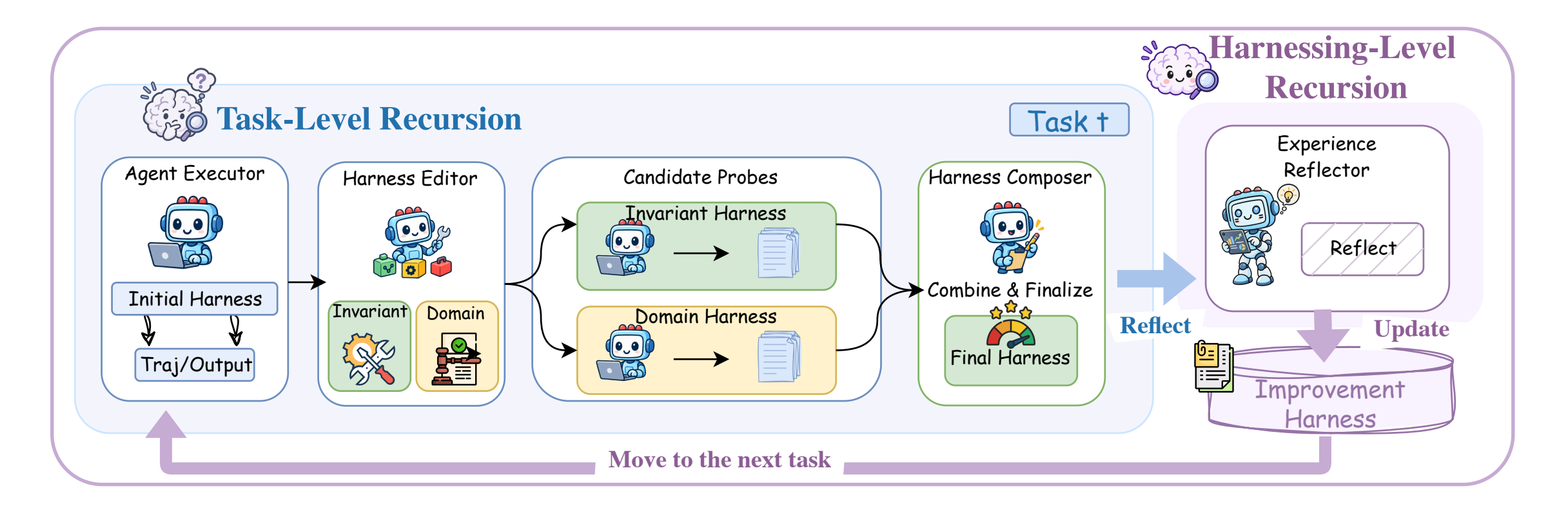
This step is the core of Harness². It lets the agent improve without a grader. The Harness² website shows these eight stages for one task.
EXPERIENCE.md.With k = 1, one task uses one reference run, two probe runs and one final run.
The method is contrastive. The runs use the same task and the same model. Only the harness changes. So a difference in behavior shows the effect of an edit. The paper calls these "behavioral contrasts."
Akshay Pachaar summarizes it this way: "because it learns from the differences between runs, it needs no correct answer or grader for the task."
In one JobBench case, the base agent did not reconcile its source files. It also never opened its outputs again to check them. The improved harness added verification guardrails, a reconciliation skill and more exact tool guidance. (Source: Harness² website, "A closer look.")
You can give Harness² a larger budget, k. It can use that budget in two ways. The README says: "Parallel recursion explores wider; sequential recursion refines deeper."
Probe k general and k domain-specific candidates. Then produce k compositions from the shared evidence.
Good when you have compute to run many candidates at the same time.
Run k Propose–Probe–Compose steps, one after another. Each step carries the refined harness and all evidence forward.
Good when each improvement depends on the last one.
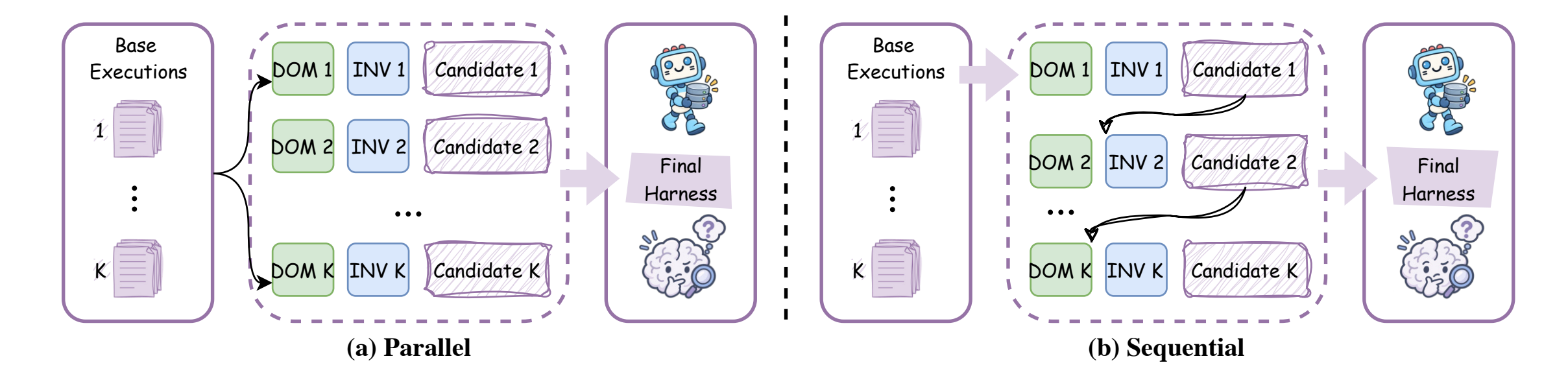
On the WorkBuddy-Bench code subset, the Harness² website reports a gain of 4.3 points from k = 1 to k = 5 with parallel recursion.
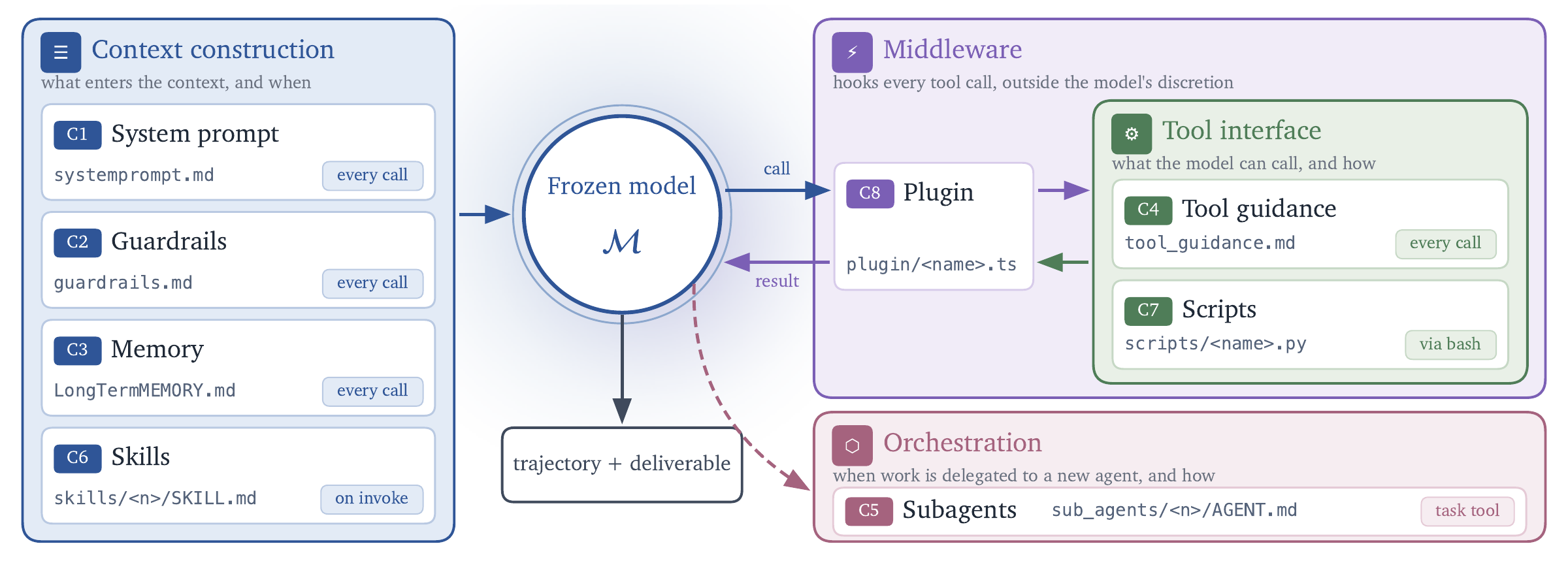
Harness² can edit more than the prompt. It exposes eight components. They control what enters the context, how the agent uses tools, how it hands off work, and what happens inside the tool loop.
The group names (context, tool interface, orchestration, middleware) come from the Harness² README and website. The short notes for C2 to C8 are our plain-language summary.
Google tested Harness² on three professional benchmarks: WorkBuddy-Bench (office, web and code), JobBench (professional work) and LAB (legal work). It used two models, Gemini 3.5 Flash and GLM-5, with OpenCode and Codex executors. That gives four model–harness configurations.
These are the largest gains from one Harness² step, as the paper abstract reports. A larger budget gave more gains.
Reported means across three runs, from the Harness² website. Higher is better.
| Method | Code | Web | Office | Average |
|---|---|---|---|---|
| Base harness | 73.4 | 69.9 | 74.0 | 72.4 |
| ReasoningBank | 72.6 | 70.7 | 76.8 | 73.4 |
| Meta-Harness | 75.5 | 75.1 | 78.6 | 76.4 |
| Harness Scaling | 74.0 | 74.0 | 77.9 | 75.3 |
| Harness² · k=1 | 76.5 | 76.4 | 79.5 | 77.5 |
| Harness² · k=5 | 80.8 | 78.3 | 83.4 | 80.8 |
The paper also reports two transfer results. A library built with a larger budget gave stronger later edits, even with no extra probes. A library from JobBench improved results on WorkBuddy-Bench.
You need Linux, Python 3.12 and uv. Do these steps from the repository root.
The demo runs both recursion modes with real Python runs. It needs no model credentials, so it costs nothing.
git clone https://github.com/google-research/harness2
cd harness2
uv venv --python 3.12 .venv
source .venv/bin/activate
uv pip install -e '.[render]'
harness2-demo --output runs/demo --k 2For real benchmarks, install Node.js 20+ and the Google Cloud CLI. LAB needs Pandoc and Poppler. WorkBuddy-Bench needs Docker.
cp .env.example .env
# Edit .env with your Vertex AI project and model IDs.
gcloud auth application-default loginStart small. The full LAB task stream has 1,143 tasks. Add --dry-run to see the task list with no model calls.
harness2-setup lab
harness2-check --bench lab
harness2 --bench lab --k 1 --mode parallel \
  --only-domains antitrust-competition --max-tasks 1
harness2-judge --bench lab --k 1 --mode parallel
harness2-report --bench lab --k 1 --mode parallel| Option | What it does |
|---|---|
--k 1 | One Propose–Probe–Compose step, then reflection |
--k K --mode parallel | K candidates per scope and K compositions |
--k K --mode sequential | K steps, one after another |
--substrate cx | Use Codex in place of OpenCode |
--workers N | Run N domains at the same time |
--seed N | Shuffle the task stream the same way each time |
Use the same benchmark, executor, subset, k, mode and seed for refinement, judging and reporting. To resume, run the same command again.
You do not need to run Harness² to use its ideas. These recipes are our own advice, based on the sources. They are not steps from the paper.
This is a small, manual version of Propose, Probe, Compose.
This copies harnessing-level recursion. The paper's future-work section names library cleanup as an open problem.
Read the log of the last run and my current system prompt, tools and skills.
Propose two harness edits: one general, one specific to this kind of task.
For each edit, say which part it changes (prompt, guardrail, memory, tool guidance, subagent, skill, script or plugin).
Do not change anything yet. Tell me how we will compare the runs.We checked each video below on its official source. We embed only those two.
A short animated tour of the two-level loop. Watch this first.
Explains harness, loop and graph. Then it walks through the PR review graph with fan-out, join and router.
A viral X post shares a long video and calls it a Google breakdown of graph engineering. We could not confirm that Google published that video. The clip on X is about 1 hour 25 minutes long, not 1 hour. So we do not embed it. For an official start, use the ADK 2 codelab and the video above.
Model + HarnessPrompts → Agents → Loops → Graphsnodes + edges + shared statefan-out · join · routerPropose → Probe → Compose (this task)Reflect → update library (next tasks)wider: k candidates per scopedeeper: k steps in a rowprompt, guardrails, memory, tool guidance, subagents, skills, scripts, pluginsharness2-demo --output runs/demo --k 2harness2 --bench lab --dry-run--substrate cxdocs/EXPERIMENTS.md and figures (Apache 2.0).Built for Hanson Lab, Oct 18, 2026. Harness² is new and can change. If this guide and the repository do not agree, use the repository.